This post will explore how an adaptive, intelligent system could empower users with disabilities to optimize their experience in digital environments. Even were such a system available tomorrow, developers of digital content, services, and products would still be responsible for providing equal access to ALL users.
Consider a few of the many exciting advances in assistive technology and digital accessibility over the past few years:
- Auracast: a technology that enables one device to transmit sound (e.g., language translation) wirelessly to multiple users with a compatible device, faster than traditional Bluetooth, without requiring pairing,
- PlayStation Access Controller: a highly customizable controller kit designed for gamers with limited motor control,
- The European Accessibility Act (EAA): digital accessibility legislation that applies to both the hardware and software of digital products and services.
There has also been an enormous increase in the availability, capability, and use of artificial intelligence (AI). AI methodologies such as natural language processing, computer vision, and machine learning are actively transforming both assistive technologies and digital accessibility practices. As Giansanti and Pirrera (2025) observe:
“AI itself is expanding the concept of assistive technology, shifting from traditional tools to intelligent systems capable of learning and adapting to individual needs. This evolution represents a fundamental change in assistive technology, emphasizing dynamic, adaptive systems over static solutions.”
I’d like to propose a term for the space where assistive technology, digital accessibility, and artificial intelligence converge: Intelligent Digital Accessibility Assistance.
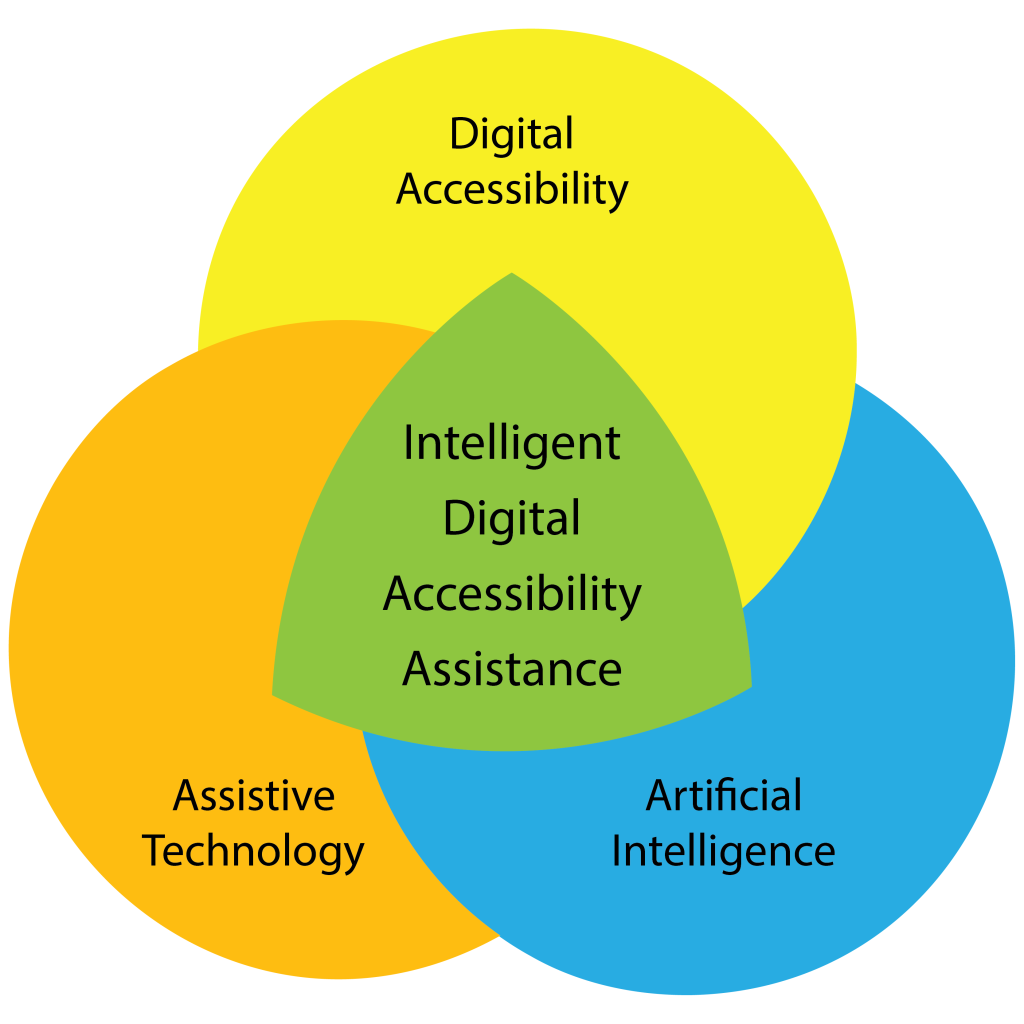
As a thought experiment, let’s explore the concept of a proactive, personalized mediator that provides assistance by empowering a user to adapt, translate, and restructure digital content and environments to match their unique preferences. I will call this an Intelligent Digital Accessibility Assistant (IDAA).
User Configuration and Training
Each user would help their IDAA develop and cultivate a comprehensive understanding of their environment, needs, preferences, abilities, and disabilities. In early versions, setup may require a manual process to understand the user’s assistive technology, preferences for interacting with digital content, and digital activities. However, as these Intelligent Assistants mature, the setup could happen automatically by observing and learning a user’s requirements and preferences. The user could then choose to have the assistant automatically adapt based on an ongoing analysis of their behavior, either autonomously, or by providing recommendations for them to authorize or reject.
Tools
In the setup stage, a blind person might specify that they use both software (e.g., screen reader) and hardware (e.g., braille display) assistive technology. The Assistant would need to know details such as software version or product model number and any customizations made to the default settings. A user could then elect to have the Assistant notify the user with real-time developments related to their assistive technology: changes to a user interface, new features, software/firmware updates, etc. An Assistant might also be tasked with identifying and sharing emerging best practices for a user’s tools.
Content
To help the IDAA understand their general preferences, a user could grant permissions that would allow the Assistant to monitor and analyze specified interactions with digital content. For example, when a screen reader encounters a legacy website with poor semantic markup, the user might instruct the Assistant to analyze the visual layout and text hierarchy to infer the missing structure required by their assistive technology. Or when reading an email with a significant amount of visual formatting styles (italics, bold, strikethrough), a user might ask the Assistant to dynamically update their screen reader’s settings to present formatted text in a distinctive speech style.
Activities
A user could also configure settings for different session “modes”. For example, in “research” mode a user could have the IDAA rapidly scan an academic paper, generate a jargon-free summary, and generate tables for any visual charts. Or a user might switch to “entertainment” mode to watch a movie. The Assistant would silence audio notifications for non-critical messages, and generate a log of messages to review later. While an Assistant would likely have some default modes, it could also help a user build custom modes based on their engagement preferences for additional types of digital content and/or specialized virtual environments.
User-driven Accessibility
After establishing a baseline awareness of a user’s current digital engagement practices, an Assistant’s ongoing encoding process would continue to optimize its alignment with the user. To facilitate this process a user might instruct an Assistant to:
- Develop recommendations for the expansion, refinement, and revision of its context awareness.
- Propose new capabilities for the user to authorize.
- Conduct web research to identify new accessibility resources aligned with the user’s preferences.
In such an environment, the degree of collaboration with an Assistant is truly open-ended, and completely determined by the user.
Conclusion
As a daily user of artificial intelligence, and a researcher seeking to understand the rapidly-evolving scope of its capabilities, I feel confident in stating that the availability of something like an Intelligent Digital Accessibility Assistant, is a “when”, not an “if”. There are significant concerns with AI that must be addressed: equity of access, bias in training data, environmental impacts, and reliability. And there is also a growing potential for a user with a disability to partner with AI to expand their access to the digital world.
I hope you found this exploration thought-provoking and inspiring, and that you will share your thoughts, concerns, and questions in the comments section.
As a hearing aid user, I’m quite excited for auracast technology being integrated into venues and hearing aids. The old hearing loop system was remarkably unreliable.
As a company of users who live with disabilities, our team has struggled through the “anti-nothing about us without us” phase that accessibility overlays ushered in. In the wake of this, it’s almost startling to hear someone propose that WE be the catalysts of our own accessibility.
Defining what we need in a way that is as personal to each of us as how we use AT. Acknowledging that like our disabilities, accessibility requires something that works for us as individuals.
Thanks so much for this, George!
Hi KWD,
Thanks for your comment. I saw a sign that my ENT doctors have this running in their office, so it looks like it is getting out there 👍
Regards,
George
Hi Lynn,
You’re welcome!
And thank you for sharing how this post resonated for you and your team 🙂
Regards,
George